Maintenance & hosting
WordPress maintenance & migration
Keeping a fleet of 117 client WordPress sites updated, backed up, secure and online, and migrating sites between hosts. Worked on while working with Northbase.
- Client
- Northbase clients
- My role
- Maintenance, updates, security, backups and migrations
- Stack
- WordPress, WP Remote, BlogVault, WP-CLI, Bash, SSH, PHP
- Worked on with
- Northbase
Case study
Problem
Northbase looks after WordPress sites for clients ranging from schools and sporting associations to building companies. Every one of those sites needs core, plugin and theme updates, backups, security monitoring and uptime checks. And when a single update breaks a page or an SSL certificate lapses, it’s the client who notices first.
Done one site at a time, that work doesn’t scale past a handful of sites.
Approach
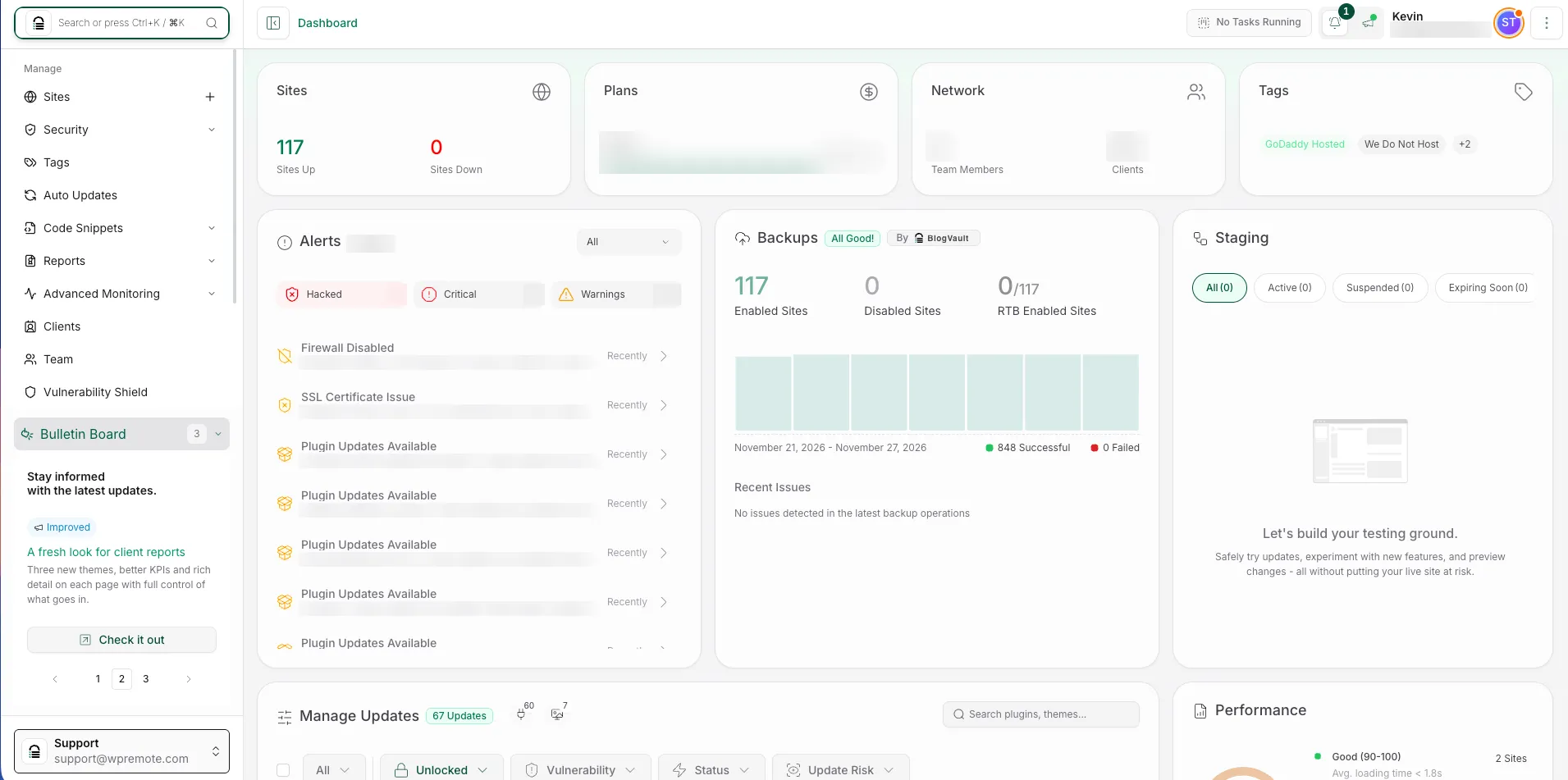
Run the whole fleet from one place. Instead of logging in to each site, every site is connected to a single dashboard (WP Remote) that shows uptime, security alerts, backups and pending updates across all of them. Sites are tagged by where they’re hosted, so hosting-specific issues and migrations are easy to group.
Implementation
- Uptime: every site is monitored, so a site going down shows up straight away.
- Backups: every site is backed up by BlogVault, with failed backups flagged.
- Security: firewall status, vulnerability alerts and hack detection for each site, with problems such as a disabled firewall or an SSL certificate issue raised as alerts.
- Updates: plugin, theme and core updates are managed centrally and can be filtered by vulnerability and update risk. Staging is available to test a risky update before it reaches a live site.
- Migrations: when a site needs to move hosts, it’s migrated from the command line (see below) and brought under the same monitoring, backup and update routine.
Migrations from the command line
Site migrations are done on the servers themselves rather than through a migration plugin. I connect to the old and new hosts over SSH, use WP-CLI to export and import the database and to update the site’s URLs and configuration, and use Bash commands to package and move the files between servers. Working this way avoids plugin upload limits and timeouts on larger sites, and the same commands work on every host that offers SSH access.
I’ve written up part of this workflow in How to set WordPress configuration variable using wp-cli.
Outcome
A snapshot from the dashboard on 27 November 2026:
- 117 sites up, 0 down
- 848 successful backups, 0 failed, from 21 to 27 November
Stack
WordPressWP RemoteBlogVaultWP-CLIBashSSHPHP